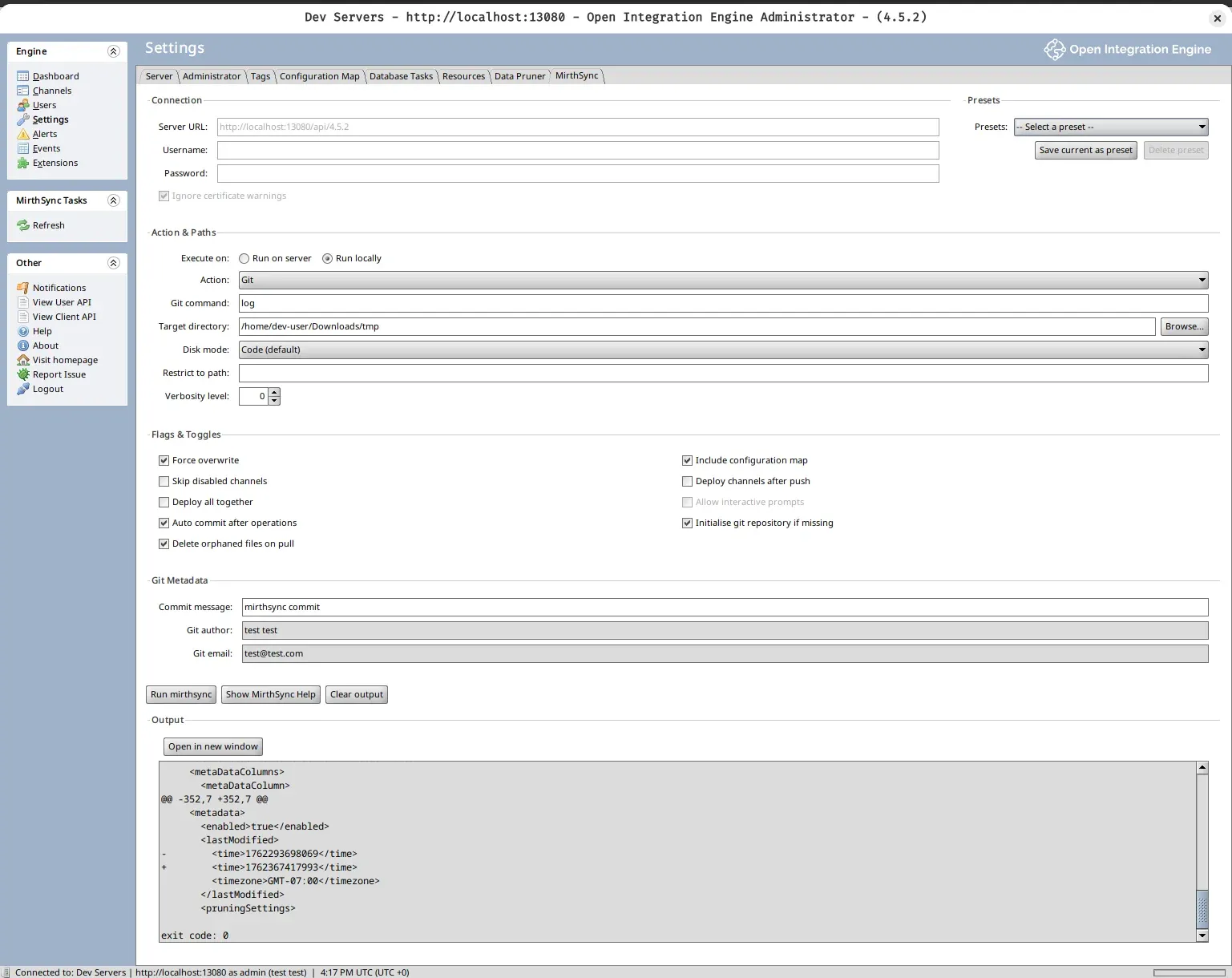
All-in-one Admin Console extension with embedded Git, MirthSync CLI, and graphical interface. Install once, version control immediately—no separate tools required.
The MirthSync Plugin brings enterprise-grade version control directly into the Mirth Connect Admin Console. Unlike the CLI which requires terminal access, the plugin provides a complete graphical interface for Git operations, configuration management, and team collaboration—all within the familiar Admin Console environment you already use daily.
What makes it all-in-one: A single JAR file contains embedded Git (no separate installation), the complete MirthSync CLI (built-in), and a full graphical interface (point-and-click operations). After installation, you have immediate access to version control, branching, pull requests, and deployment workflows without installing anything else.
Requirement Details Open-source Mirth Connect 4.x+ OIE All versions Java 8+ (provided by Mirth) Installation Access File system access to extensions directory
All the power of MirthSync CLI with a graphical interface—no terminal required.
Git Version Control
Full Git functionality from the Admin Console. Track changes, view history, create branches, and rollback—all without leaving the GUI.
Visual commit workflow with diff preview
Branch management with dropdown selection
Complete version history and blame tracking
One-click rollback to any previous state
Learn more →
GUI-Based Workflow
Work entirely in the Admin Console—no terminal needed. Visual interface for all operations with real-time feedback and clear status indicators.
Point-and-click Git operations
Visual confirmation of all settings
Real-time output panel
No command-line knowledge required
Plugin Guide →
Presets & Automation
Save common operations as presets for one-click execution. Store environment-specific configurations and share with your team.
Save action + flags + metadata as named presets
Environment-specific configs (Dev, Test, Prod)
Export/import team configurations
Reduce errors with consistent settings
Best practices →
Dual Execution Modes
Choose where commands execute: local workstation or Mirth server. Flexible deployment options for different team workflows.
Local : Fast, personal repositories on workstationServer : Shared, centralized team repositoriesSwitch between modes based on task
Mix strategies for dev and production
Multi-environment guide →
Team Collaboration
Enable team workflows with pull request reviews and conflict resolution. Multiple team members can work safely with the same Mirth instance.
Visual conflict resolution
Pull request integration
Shared presets across team
Audit trail with commit attribution
Collaboration guide →
Embedded Tools
Everything included in one JAR file. Embedded Git and MirthSync CLI mean zero external dependencies or separate installations.
Full Git functionality (no separate install)
Complete MirthSync CLI
Works out of the box
No Node.js, no separate tools
Installation →
Use Plugin When Use CLI When
Working in Admin Console
Prefer visual interface
Want preset management
Need output window
Team uses Admin Console exclusively
Automating with scripts
Working in terminal
CI/CD pipelines
Scripting deployments
Prefer command-line workflow
The plugin executes MirthSync CLI commands. All CLI documentation applies to plugin operations.
Ready to bring version control to your Mirth Connect or Open Integration Engine Admin Console?
Quick overview:
Download the plugin JAR file
Copy to Mirth Connect extensions directory
Restart Mirth Connect
Start using version control from the Admin Console
→ Get Started with Installation Guide