SMART on FHIR (Substitutable Medical Applications, Reusable Technologies on Fast Healthcare Interoperability Resources) is the standard framework for building healthcare applications that integrate with EHR systems. It combines FHIR for data access with OAuth 2.0 for authorization, creating a consistent pattern for apps to launch from within EHRs, authenticate users, obtain authorized access to patient data, and operate across different EHR platforms.
If you are building a clinical decision support tool, a patient-facing app, a population health dashboard, or any application that needs to read or write EHR data, SMART on FHIR is the path. This guide covers the framework from end to end: launch contexts, authorization flows, scopes, token management, backend services, and marketplace publishing.
What Is SMART on FHIR
SMART on FHIR emerged from the SMART Health IT project at Boston Children’s Hospital and Harvard Medical School. The core idea is straightforward: healthcare apps should be substitutable. A clinician should be able to swap one clinical decision support app for another without rebuilding the EHR integration from scratch. For that to work, apps need a standardized way to launch, authenticate, and access data.
The SMART App Launch Framework (currently at version 2.0) defines this standard. It specifies:
- How an app discovers a FHIR server’s authorization endpoints.
- How an app requests and receives authorization from the user or system.
- What scopes (permissions) an app can request.
- How an app receives context about the current patient, encounter, or user.
- How an app manages access tokens and refresh tokens.
The framework is EHR-agnostic. An app built to the SMART specification can work with Epic, Oracle Health (Cerner), athenahealth, and any other EHR that implements the SMART App Launch Framework. In practice, there are implementation differences between EHR vendors, but the core protocol is consistent.
SMART App Launch: Two Contexts
SMART defines two launch contexts that determine how the app starts and what context information it receives.
EHR Launch
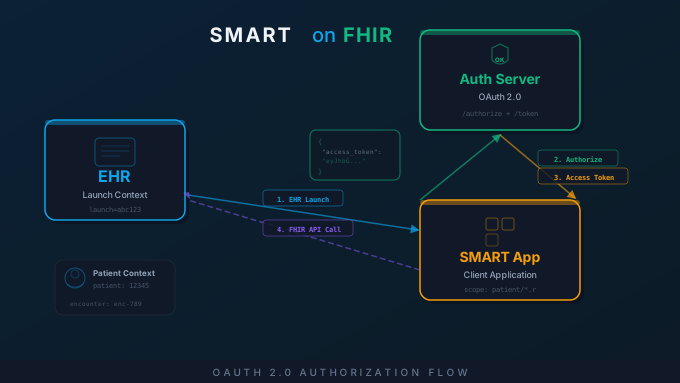
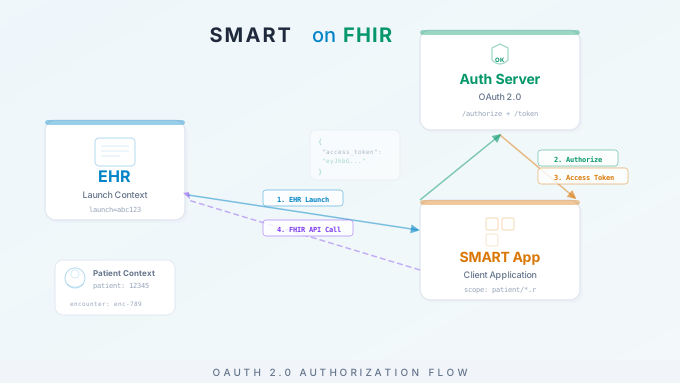
In an EHR launch, the app is initiated from within the EHR interface. The clinician clicks a link, button, or menu item inside the EHR, and the app opens in a new tab, iframe, or embedded panel. The EHR passes context to the app, including the current patient, the current encounter, and the authenticated user.
The EHR launch flow:
- The EHR constructs a launch URL that includes the app’s registered launch URI plus a
launchparameter (an opaque token) and anissparameter (the FHIR server URL). - The app receives the launch request and uses the
issparameter to discover the FHIR server’s authorization endpoints (via the.well-known/smart-configurationendpoint or the FHIR CapabilityStatement). - The app redirects the user to the authorization server’s authorize endpoint, including the
launchtoken in the request. - The authorization server authenticates the user (or recognizes the existing EHR session) and presents a consent screen if required.
- The authorization server redirects back to the app with an authorization code.
- The app exchanges the authorization code for an access token, which includes context parameters (patient ID, encounter ID, etc.).
The key advantage of EHR launch is context. The app knows which patient the clinician is viewing, which encounter is active, and who the user is. This enables the app to immediately display relevant information without requiring the user to search for a patient.
Standalone Launch
In a standalone launch, the app starts independently, outside the EHR. The user navigates directly to the app (e.g., a web URL or mobile app), and the app must discover the FHIR server, authenticate the user, and obtain patient context on its own.
The standalone launch flow:
- The app prompts the user to select a FHIR server (or has a preconfigured server).
- The app discovers the authorization endpoints via
.well-known/smart-configuration. - The app redirects the user to the authorization endpoint, requesting the
launch/patientscope (which tells the authorization server to include a patient picker). - The authorization server authenticates the user and presents a patient picker if the
launch/patientscope was requested. - The user selects a patient. The authorization server redirects back to the app with an authorization code.
- The app exchanges the code for an access token that includes the selected patient ID.
Standalone launch is common for patient-facing apps (where the patient logs in with their portal credentials), administrative dashboards, and apps that operate outside the clinical workflow.
OAuth 2.0 Authorization Flow
Both launch types use OAuth 2.0 Authorization Code Grant as the underlying authorization mechanism. Here is the step-by-step flow with the relevant HTTP requests.
Step 1: Discovery
The app retrieves the FHIR server’s SMART configuration:
GET https://fhir.example.com/.well-known/smart-configurationResponse:
{ "authorization_endpoint": "https://auth.example.com/authorize", "token_endpoint": "https://auth.example.com/token", "token_endpoint_auth_methods_supported": ["client_secret_basic", "private_key_jwt"], "scopes_supported": ["patient/*.read", "user/*.read", "launch", "openid", "fhirUser"], "capabilities": ["launch-ehr", "launch-standalone", "client-public", "client-confidential-symmetric"]}Step 2: Authorization Request
The app redirects the browser to the authorization endpoint:
GET https://auth.example.com/authorize? response_type=code& client_id=my-smart-app& redirect_uri=https://myapp.example.com/callback& scope=launch patient/Patient.read patient/Observation.read openid fhirUser& state=abc123& aud=https://fhir.example.com& launch=xyz789Key parameters:
response_type=code: Requests an authorization code (not an implicit token).client_id: The app’s registered client identifier.redirect_uri: Where the authorization server sends the user after authorization.scope: The permissions the app is requesting (detailed in the next section).state: A random value the app generates to prevent CSRF attacks.aud: The FHIR server URL the app intends to access.launch: The launch token from the EHR (EHR launch only).
Step 3: Authorization Code
After the user approves, the authorization server redirects back to the app:
HTTP/1.1 302 FoundLocation: https://myapp.example.com/callback?code=AUTH_CODE_HERE&state=abc123The app verifies that the state parameter matches the value it sent, then exchanges the code for tokens.
Step 4: Token Exchange
The app sends a POST request to the token endpoint:
POST https://auth.example.com/tokenContent-Type: application/x-www-form-urlencoded
grant_type=authorization_code&code=AUTH_CODE_HERE&redirect_uri=https://myapp.example.com/callback&client_id=my-smart-app
For confidential clients, the app also includes its client secret (via HTTP Basic auth or in the request body) or a signed JWT assertion.
Step 5: Token Response
The authorization server returns an access token with context:
{ "access_token": "eyJ0eXAiOiJKV1QiLCJhbGciOi...", "token_type": "Bearer", "expires_in": 3600, "scope": "patient/Patient.read patient/Observation.read openid fhirUser", "patient": "12345", "encounter": "67890", "id_token": "eyJ0eXAiOiJKV1QiLCJhbGciOi...", "refresh_token": "dGhpcyBpcyBhIHJlZnJlc2ggdG9rZW4..."}The patient field contains the patient ID from the launch context. The encounter field (if present) contains the active encounter ID. The app uses the access_token to make FHIR API calls.
Step 6: FHIR API Calls
With the access token, the app can query the FHIR server:
GET https://fhir.example.com/Patient/12345Authorization: Bearer eyJ0eXAiOiJKV1QiLCJhbGciOi...Accept: application/fhir+jsonThe FHIR server validates the token, checks that the requested resource is within the granted scopes, and returns the data.
SMART Scopes Explained
SMART scopes define what an app can access. The scope syntax follows a structured format.
Patient-Level Scopes
Patient-level scopes restrict access to data associated with the patient in context:
patient/[ResourceType].[Permission]Examples:
patient/Patient.read— Read the patient’s demographic data.patient/Observation.read— Read the patient’s observations (labs, vitals, etc.).patient/MedicationRequest.read— Read the patient’s medication orders.patient/Condition.read— Read the patient’s problem list.patient/*.read— Read all resource types for the patient.
User-Level Scopes
User-level scopes grant access based on the authenticated user’s permissions, not limited to a single patient:
user/[ResourceType].[Permission]Examples:
user/Patient.read— Read any patient the user has access to.user/Encounter.read— Read encounters the user has access to.user/*.write— Write any resource the user has access to.
System-Level Scopes
System-level scopes are used by backend services (no user involved):
system/[ResourceType].[Permission]Examples:
system/Patient.read— Read any patient (backend service access).system/*.read— Read all resources (backend service access).
Special Scopes
launch— Indicates the app supports EHR launch.launch/patient— Requests a patient picker during standalone launch.launch/encounter— Requests an encounter picker during standalone launch.openid— Requests an OpenID Connect ID token.fhirUser— Requests the FHIR resource URL of the authenticated user.offline_access— Requests a refresh token for long-lived access.
SMART v2 Granular Scopes
SMART App Launch v2 introduced more granular scope syntax that supports search parameter filtering:
patient/Observation.rs?category=vital-signsThis requests read and search access to the patient’s Observations, but only those with the vital-signs category. Granular scopes allow apps to request precisely the data they need, following the principle of least privilege. Not all EHR vendors support granular scopes yet, so check your target platform’s documentation.
Token Management
Proper token management is essential for both security and reliability.
Access Token Expiration
Access tokens have a limited lifetime, typically 30 to 60 minutes (EHR-dependent). Your app must handle token expiration gracefully. Check the expires_in value in the token response and refresh the token before it expires.
Refresh Tokens
If you requested the offline_access scope and the authorization server granted it, you receive a refresh token. Use it to obtain a new access token without requiring user interaction:
POST https://auth.example.com/tokenContent-Type: application/x-www-form-urlencoded
grant_type=refresh_token&refresh_token=dGhpcyBpcyBhIHJlZnJlc2ggdG9rZW4...&client_id=my-smart-app
The response includes a new access token (and potentially a new refresh token). Refresh tokens can also expire or be revoked. Your app should handle refresh failures by redirecting the user through the authorization flow again.
Token Storage
Store tokens securely. For web applications, use server-side sessions or encrypted cookies. Never expose tokens in URLs, browser local storage (vulnerable to XSS), or client-side JavaScript that is accessible to untrusted code. For native mobile apps, use the platform’s secure storage (Keychain on iOS, Keystore on Android).
Backend Services Authorization
Not all SMART apps involve a user. Backend services (batch processing, population health analytics, data synchronization) need to access FHIR data without user interaction. SMART Backend Services authorization uses the OAuth 2.0 Client Credentials Grant with asymmetric key authentication.
How Backend Services Work
- Register the backend service with the FHIR server’s authorization server. Provide the service’s public key (as a JWKS URL or direct key upload).
- Create a signed JWT assertion using the service’s private key. The JWT includes the client ID, the token endpoint URL, an expiration time, and a unique identifier.
- Request an access token by sending the JWT to the token endpoint:
POST https://auth.example.com/tokenContent-Type: application/x-www-form-urlencoded
grant_type=client_credentials&scope=system/Patient.read system/Observation.read&client_assertion_type=urn:ietf:params:oauth:client-assertion-type:jwt-bearer&client_assertion=eyJ0eXAiOiJKV1QiLCJhbGciOi...- Receive an access token with system-level scopes. No user context, no patient context. The service accesses data based on its registered permissions.
Backend services are commonly used for:
- Bulk data export ($export operations for population health or payer data exchange).
- Integration engine FHIR connections (Mirth Connect or OIE channels that push/pull FHIR data).
- Data warehouse synchronization (periodic extraction of clinical data for analytics).
- Clinical quality measure calculation (eCQM processing across a patient population).
EHR App Marketplace Publishing
Once your SMART on FHIR app is built and tested, publishing it through an EHR marketplace makes it discoverable and installable by healthcare organizations using that EHR.
Epic App Orchard / Galaxy
Epic’s app marketplace (previously App Orchard, now transitioning to Galaxy) is the largest EHR app ecosystem. To publish:
- Register as a developer on the Epic developer portal (open.epic.com).
- Create an app record specifying your app’s FHIR resource requirements, launch type (EHR or standalone), and scopes.
- Test against the Epic sandbox (a free FHIR test environment with synthetic data).
- Complete the App Orchard review process, which includes a security review, privacy assessment, and functional testing.
- Once approved, your app appears in the marketplace and Epic customers can request activation.
Epic’s review process is thorough. Expect multiple rounds of review and several weeks to several months for approval, depending on the complexity of your app and the scopes it requests. Apps that request write access or sensitive scopes receive additional scrutiny.
Oracle Health (Cerner) Code
Oracle Health (formerly Cerner) operates the Code developer program:
- Register on code.cerner.com and create an application.
- Test against Cerner’s sandbox environments with synthetic patient data.
- Submit for review through the Code Console.
- After approval, organizations using Oracle Health can activate your app.
Cerner’s FHIR implementation has some differences from Epic’s (different supported resources, different extensions, different search parameter support). Test thoroughly against both platforms if you intend to be cross-platform.
SMART App Gallery
The SMART App Gallery (gallery.smarthealthit.org) is a community directory of SMART on FHIR apps. It is not an EHR-specific marketplace but serves as a central directory for the SMART ecosystem. Listing your app here increases visibility and helps potential users discover it.
Testing with Public Sandboxes
Before testing against production EHR environments, use public SMART on FHIR sandboxes:
SMART Launcher (launch.smarthealthit.org): A free test environment that simulates both EHR launch and standalone launch flows. It supports FHIR R4 and can be configured with different patients, practitioners, and encounter contexts. This is the fastest way to test your app’s launch flow.
Epic Sandbox (open.epic.com): Epic provides a free sandbox with synthetic patient data. You can test your app’s FHIR queries, launch flow, and scope handling against an environment that behaves like a production Epic instance.
Cerner Sandbox (code.cerner.com): Oracle Health provides sandbox environments for testing against their FHIR implementation. Registration is free.
Inferno (inferno.healthit.gov): ONC’s testing tool for FHIR conformance. While primarily designed for testing FHIR servers, it is useful for verifying that your app correctly handles US Core profiles, capability statements, and SMART authorization flows.
Common Pitfalls
After building and reviewing dozens of SMART on FHIR applications, we see the same issues repeatedly.
Scope management. Requesting more scopes than your app needs triggers additional review scrutiny from EHR vendors and raises privacy concerns. Request the minimum scopes required for your app’s functionality. Use SMART v2 granular scopes where supported to further limit access.
Token refresh failures. Apps that do not handle refresh token expiration or revocation gracefully break during long user sessions. Always have a fallback path that redirects the user through the full authorization flow when refresh fails.
CORS issues. Browser-based SMART apps making FHIR API calls from JavaScript will encounter CORS restrictions. Some FHIR servers do not support CORS at all, requiring a backend proxy. Test CORS behavior against each target EHR’s sandbox before assuming direct browser-to-FHIR communication will work.
Redirect URI configuration. The redirect URI in your authorization request must exactly match the URI registered with the authorization server. Mismatches (trailing slashes, http vs. https, different ports) cause authorization failures that can be difficult to debug.
Assuming consistent FHIR implementations. Each EHR implements FHIR differently. A query that works against Epic may not work against Oracle Health. Resource types, search parameters, extensions, and supported operations vary. Always test against each target platform and code defensively for missing data.
Ignoring the CapabilityStatement. The FHIR server’s CapabilityStatement tells you exactly what resources, search parameters, and operations it supports. Query it at startup and adapt your app’s behavior accordingly, rather than assuming capabilities.
SMART on FHIR is the standard path for building interoperable healthcare applications. The framework’s combination of FHIR data access and OAuth 2.0 authorization provides a consistent, secure, and portable integration model across EHR platforms.
For help building SMART on FHIR applications or integrating with EHR APIs, explore our related services:
- FHIR API Integration — FHIR R4 API development, US Core compliance, and SMART app integration
- Epic Integration Services — Epic FHIR API integration, App Orchard publishing, and Bridges configuration
- Medical Software Development — Custom healthcare application development
- Epic EHR Integration Guide — Deep dive into Epic’s integration architecture