MirthSync VS Code Extension
Professional development environment for Mirth Connect and Open Integration Engine. IntelliSense, real-time code diagnostics, Java debugging, channel tree views, and multi-server sync — all from Visual Studio Code.
Mirth Connect Development in Your IDE
Full-featured VS Code extension for Mirth Connect channel management, IntelliSense, and multi-server sync.
VS Code Extension. MirthSync for VS Code brings Mirth Connect and Open Integration Engine development into Visual Studio Code. Browse channels and code templates in a tree view, sync individual items or everything at once, and get IntelliSense autocomplete for Mirth Connect's JavaScript API — all without leaving your editor.
The extension supports multi-server connection profiles with secure credential storage via VS Code's Secrets API. Switch between development, staging, and production environments from the sidebar, and use status bar controls to toggle ConfigMap inclusion, force sync, and auto-deploy settings. Built-in code diagnostics catch security issues and deprecated APIs as you type, while Java debugger integration and 28 code snippets accelerate Mirth development.
Requirements
- VS Code 1.85.0+
- Java 8+ (JRE or JDK)
- MirthSync CLI tool
- Mirth Connect 4.5.2+ or OIE
- Mirth CLI (ships with Mirth Connect / OIE)
What's Included
- Channel tree views
- IntelliSense engine
- Connection manager
- Status bar controls
- Code diagnostics & linting
- Debugger configuration
- 28 code snippets
See the Extension in Action
Interactive gallery showing MirthSync for VS Code features — IntelliSense, sync, connection management, and more.
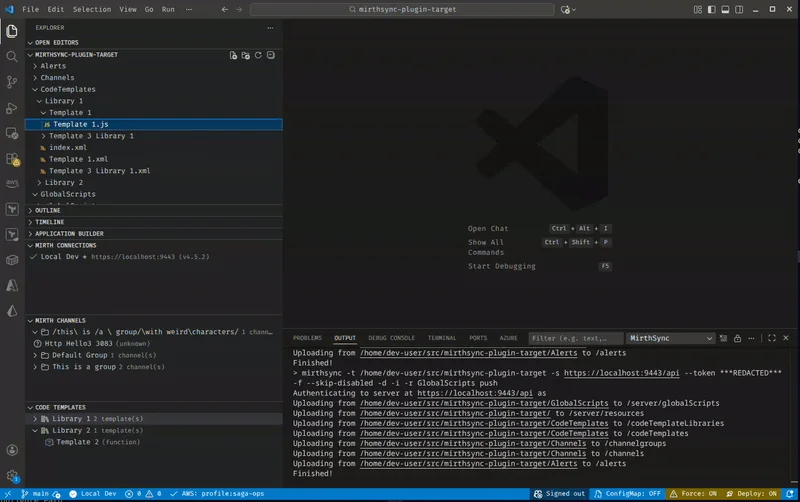
IntelliSense & Autocomplete
Get autocomplete suggestions and hover documentation for Mirth Connect's JavaScript API as you type.
Key Features:
- Auto-completion for Mirth APIs
- Hover documentation for methods and objects
- Type hints and signatures
- Code snippets for common patterns
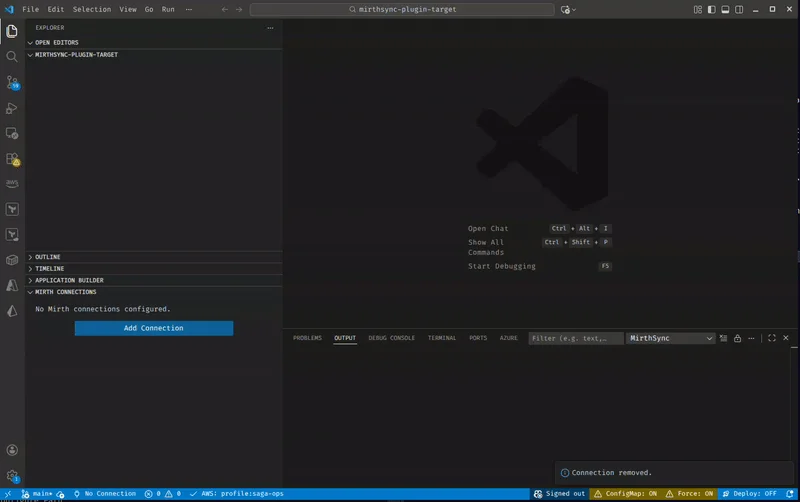
Multi-Server Connections
Add and manage multiple Mirth Connect server profiles with secure credential storage.
Key Features:
- Secure credential storage via Secrets API
- Multiple server profiles for each environment
- Test connection before saving
- Quick environment switching from sidebar
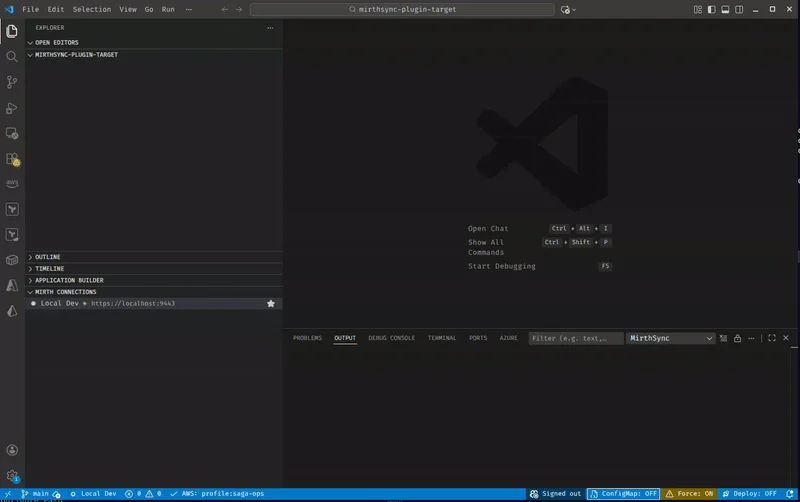
Channel & Template Sync
Pull channels and code templates from your server, edit in VS Code, and push changes back.
Key Features:
- Pull/push all or individual items
- Channel group support
- Code template library sync
- Global scripts management
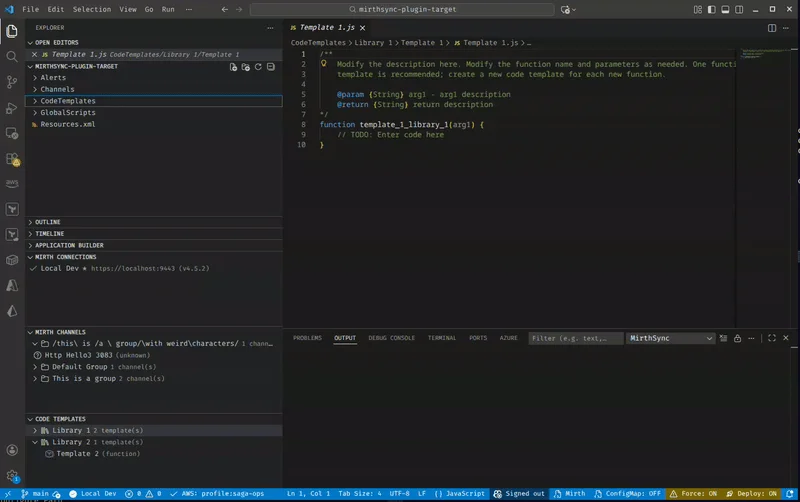
File Explorer Integration
Right-click on Channels or CodeTemplates folders to sync directly from the file explorer.
Key Features:
- Context menu push/pull
- Folder-level operations
- Quick access to sync
- Works with Git workflow
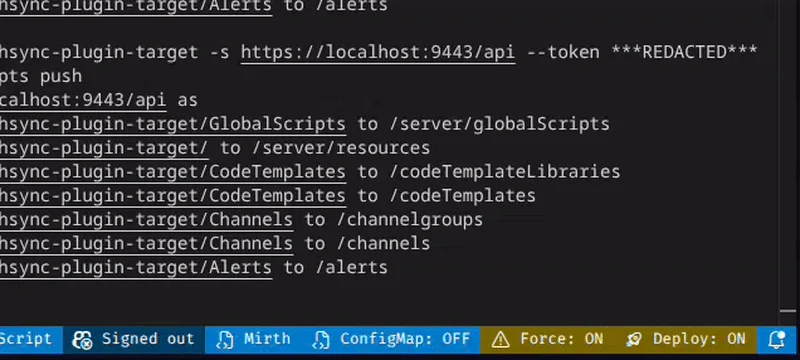
Status Bar Controls
Quick toggles in the VS Code status bar for common MirthSync settings.
Key Features:
- ConfigMap toggle include on sync
- Force toggle overwrite changes
- Deploy toggle auto-deploy after push
- Visual indicators for active settings
Mirth Connect Development Features
Nine capabilities that make Mirth Connect development faster and more reliable.
Channel Explorer
Browse channels, connectors, and code templates in a hierarchical tree view. Navigate your Mirth Connect configuration structure visually.
Language Features
IntelliSense autocomplete, hover documentation, go-to-definition, find references, rename symbol, and document outline for Mirth Connect's JavaScript API.
Connection Manager
Store multiple server profiles with secure credential storage. Switch between dev, staging, and production with one click.
Diagnostics & Linting
14 built-in rules catch security issues (SQL injection, hardcoded credentials), deprecated APIs, and common mistakes as you type — no configuration required.
Code Snippets
28 tab-completion templates for common Mirth patterns — database queries, HL7 segment access, map operations, HTTP requests, logging, and more.
Debugger
Attach to Mirth Connect's Java debug port with pre-built launch configurations for local, dev container, and remote servers.
Status Bar Controls
Quick toggles for ConfigMap inclusion, force sync, and deploy-after-push settings. See active settings at a glance.
File Explorer Sync
Right-click push and pull directly from the VS Code file explorer. Sync individual channels or entire folders.
Dev Containers
Coming Soon — Docker-based local Open Integration Engine development environment with pre-configured MirthSync tooling.
Get Started in 3 Steps
Install the extension, add a connection, and start developing — all in under two minutes.
Install Extension
Install from the VS Code Marketplace — search for "MirthSync" or click Install from Marketplace.
VS Code MarketplaceAdd a Connection
Open the MirthSync sidebar, click Add Connection, and enter your Mirth Connect server URL and credentials.
Credentials stored securely via VS Code Secrets APIStart Developing
Browse channels in the tree view, pull to your workspace, edit with IntelliSense, and push changes back.
VS Code Extension GuideMirthSync Commands for VS Code
All MirthSync operations available directly from the VS Code command palette. Press Ctrl+Shift+P and type “MirthSync” to get started.
MirthSync: Pull All
Pull all channels, code templates, and global scripts from the connected server to your workspace.
MirthSync: Push All
Push all local changes back to the connected Mirth Connect server.
MirthSync: Git Status / Diff
View Git status and diff for your MirthSync workspace directly from the command palette.
All Commands & Settings
Complete reference for all MirthSync commands, settings, snippets, and diagnostics in VS Code.
Extension ReferenceChoose Your Mirth Connect Workflow
Three tools, one file structure. Pick the right tool for the task — or use all three.
Use the Plugin When:
- You're already working in the Admin Console
- You prefer visual interfaces over command-line tools
- You need to review changes and diffs visually
- You want embedded Git without external installation
- You're making ad-hoc configuration changes
Use the CLI When:
- You're automating in CI/CD pipelines
- You need to script operations or integrate with other tools
- You prefer command-line workflows
- You're running scheduled or batch operations
Use VS Code When:
- You want IntelliSense and autocomplete for Mirth JavaScript
- You need real-time code diagnostics and security linting
- You want Java debugging for channel logic
- You prefer editing in a modern IDE with Git integration
- You need multi-cursor editing and search across channels
- You want tree view browsing of channels and templates
- You want 28 code snippets for common Mirth patterns
Fully Compatible: All three tools work with the same MirthSync file structure. Use VS Code for daily development, the CLI for automation, and the Plugin for admin tasks — they're fully interchangeable.
Install MirthSync for VS Code
Free VS Code extension for Mirth Connect development. IntelliSense, code diagnostics, Java debugging, and channel sync — install in seconds from the Visual Studio Marketplace.