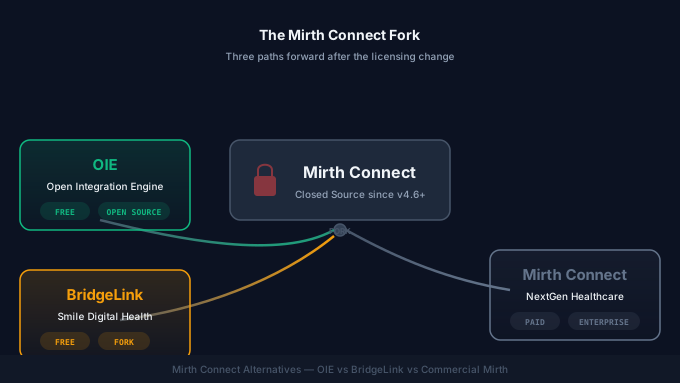
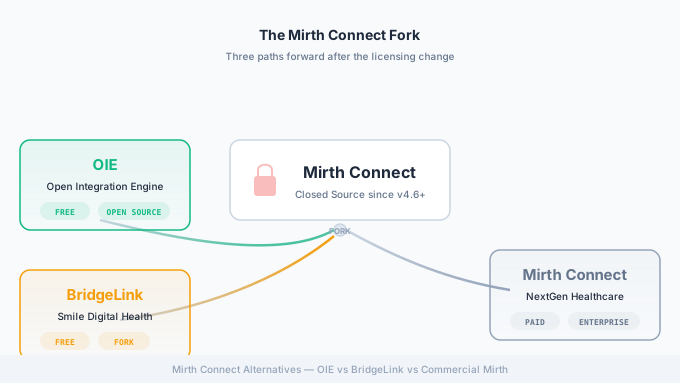
If you run Mirth Connect in production, you already know that March 2025 changed everything. NextGen Healthcare shifted Mirth Connect from an open-source project to a commercial-only product, and the ripple effects are still working through the healthcare IT industry. Integration teams that built years of institutional knowledge around Mirth’s open-source model are now weighing their options: stay put, pay up, or migrate.
This guide walks through every viable path forward. We have helped dozens of organizations navigate this transition, and we will lay out exactly what each option entails, what it costs, and who it is best suited for. Whether you are a hospital running a single Mirth instance or a health IT vendor embedding Mirth in your product, this post will help you make an informed decision.
What Changed: The Mirth Connect Licensing Shift
Mirth Connect was open source for over fifteen years. Since its creation by WebReach (later acquired by Mirthcorp, then by NextGen Healthcare), the integration engine was available under the Mozilla Public License (MPL) 2.0. This meant anyone could download, deploy, modify, and redistribute Mirth Connect at no cost. The open-source model fueled massive adoption: by some estimates, Mirth Connect powered integrations at over 1,600 healthcare organizations worldwide.
In March 2025, NextGen Healthcare announced that Mirth Connect version 4.6 and all subsequent releases would be available only under a commercial license. Version 4.5.2, released in late 2024, became the final open-source release.
The key changes:
- No more MPL 2.0 license for new versions. Mirth Connect 4.6+ requires a paid subscription from NextGen Healthcare.
- No more community downloads from the NextGen website for the commercial version without a license agreement.
- Existing open-source versions remain available. Version 4.5.2 and earlier are still licensed under MPL 2.0, and that license cannot be retroactively revoked.
- Source code for 4.5.2 and earlier is still on GitHub. Community forks can (and did) emerge from the last open-source codebase.
NextGen’s rationale centered on sustainability. Maintaining a complex integration engine while giving it away for free was, in their view, no longer viable. They pointed to the substantial R&D investment required for FHIR support, cloud-native features, and security hardening.
Regardless of the reasoning, the practical impact is significant. Organizations that relied on the open-source model need to reassess their integration strategy.
Impact Assessment: Who Is Affected
The licensing change does not affect everyone equally. Understanding where you fall helps determine the urgency of your response.
Directly Affected
- Hospitals and health systems running open-source Mirth Connect. If you downloaded Mirth from the community site and run it without a commercial license, you are on 4.5.2 or earlier. You will not receive security patches, bug fixes, or new features unless you take action.
- Health IT vendors embedding Mirth Connect. If your product bundles Mirth Connect as its integration engine (common in lab information systems, radiology solutions, and health information exchanges), the licensing change potentially affects your product licensing and distribution rights for new versions.
- Managed service providers offering Mirth Connect hosting or administration. Your service model may need to change if you were deploying open-source Mirth for clients.
Less Directly Affected
- Organizations already on commercial Mirth Connect. If you already pay NextGen for Mirth Connect licensing and support, the practical change is minimal. Your pricing may change at renewal, but you were already in the commercial ecosystem.
- Organizations using other integration engines. If you use Rhapsody, IGUANA, or a cloud-native integration platform, this change does not affect your current operations (though it may influence your competitive landscape).
The Security Concern
The most pressing issue for organizations staying on 4.5.2 is security. Mirth Connect has had critical vulnerabilities in the past. In 2023, CVE-2023-43208 was a pre-authentication remote code execution vulnerability that affected Mirth Connect versions prior to 4.4.1. CISA added it to the Known Exploited Vulnerabilities catalog. If a similar vulnerability is discovered in 4.5.2, there will be no official patch from NextGen for the open-source version. You would be dependent on community forks to address it.
Option 1: Stay on Mirth Connect 4.5.2
The simplest short-term option is doing nothing. Your existing Mirth Connect 4.5.2 deployment continues to work. Channels keep running. Messages keep flowing. Nothing breaks on day one.
What Still Works
- All existing channels, connectors, and transformations continue to function.
- The Mirth Connect Administrator console works as before.
- All community plugins and extensions compatible with 4.5.2 remain functional.
- MirthSync and other version control tooling continues to work.
- Your existing database (PostgreSQL, MySQL, SQL Server, Oracle) is unaffected.
The Risks
- No security patches. As noted above, any newly discovered vulnerabilities will not be patched by NextGen. You are responsible for monitoring CVEs and either applying community patches or implementing compensating controls.
- No new features. FHIR R4 enhancements, new connector types, performance improvements, and UI updates in 4.6+ are off-limits.
- Growing compatibility gaps. As trading partners, EHR vendors, and payers upgrade their systems, you may encounter compatibility issues with older protocol versions or TLS requirements.
- Compliance risk. Auditors and compliance officers may flag unpatched software as a risk finding, particularly for HIPAA Security Rule requirements around patch management.
- Talent challenges. As the community migrates to OIE or commercial Mirth, finding developers experienced with the 4.5.2 codebase specifically becomes harder.
When This Makes Sense
Staying on 4.5.2 is a reasonable short-term holding pattern while you evaluate your longer-term options. It makes sense if:
- You need 3-6 months to budget and plan a migration.
- Your Mirth instance handles low-risk, low-volume integrations.
- You have strong network segmentation that limits the blast radius of a potential vulnerability.
- You have in-house Java developers who can apply community security patches.
This is not a viable long-term strategy. We recommend treating it as a bridge, not a destination.
Option 2: Commercial Mirth Connect 4.6+
The most straightforward path forward is purchasing a commercial license from NextGen Healthcare. You stay on the same platform, gain access to new features, and receive vendor support.
What You Get
- Continued access to new releases. Mirth Connect 4.6 and beyond, with all new features and enhancements.
- Security patches and bug fixes. Official patches from NextGen, delivered on a regular cadence.
- Vendor support. Access to NextGen’s support team for troubleshooting, configuration guidance, and escalation paths.
- New features. Enhanced FHIR capabilities, improved monitoring, cloud deployment options, and performance improvements.
- Compliance assurance. A supported, patched product is easier to defend in audits.
Cost Considerations
NextGen does not publicly list Mirth Connect pricing. Based on what we have seen across client engagements, commercial licensing is typically structured as an annual subscription. Pricing varies based on:
- Number of Mirth Connect instances (servers)
- Message volume
- Support tier (standard vs. premium)
- Whether you are embedding Mirth in a product (OEM licensing)
For a single production instance with standard support, expect annual costs in the low-to-mid five figures. Multi-instance deployments or OEM licensing can be substantially higher. Contact NextGen directly for a quote.
Migration Effort
If you are already running Mirth Connect 4.5.2, upgrading to 4.6+ is a standard version upgrade. Channel compatibility is maintained. The migration effort is primarily:
- Obtaining and applying the commercial license.
- Performing the version upgrade (backup, install, verify).
- Testing channels in a staging environment before production cutover.
This is typically a low-risk, well-understood process that takes days, not weeks.
When This Makes Sense
Commercial Mirth Connect is a strong choice if:
- Your organization has the budget for ongoing licensing costs.
- You value vendor support and guaranteed SLAs for issue resolution.
- You want the simplest possible migration path with minimal disruption.
- You are already in the NextGen ecosystem for other products.
Option 3: Migrate to OIE (Open Integration Engine)
OIE, the Open Integration Engine, is a community fork of Mirth Connect maintained by Kaur Health. It was created in direct response to the licensing change, forking from the last open-source Mirth Connect codebase.
What OIE Is
OIE is not a new product built from scratch. It is the continuation of the open-source Mirth Connect codebase under active community development. Think of it as what Mirth Connect would have become if it had remained open source.
Key facts about OIE:
- License: Open source (continuing the MPL 2.0 tradition).
- Codebase: Forked from Mirth Connect’s open-source repository. Full channel and plugin compatibility with Mirth Connect.
- Maintained by: Kaur Health, with contributions from the broader community.
- Active development: Regular releases with bug fixes, security patches, and new features.
- Community: Growing community of healthcare IT professionals, many of whom are former Mirth Connect community members.
Channel Compatibility
This is the question everyone asks first, and the answer is reassuring: OIE maintains full compatibility with existing Mirth Connect channels. Your channel XML exports from Mirth Connect import directly into OIE. Transformers, filters, scripts, and connector configurations all carry over. The database schema is compatible, so you can even point OIE at your existing Mirth Connect database (after proper backup and testing).
Migration Path
Migrating from Mirth Connect to OIE is straightforward:
- Back up your existing Mirth Connect instance (database and application directory).
- Export your channels from Mirth Connect (or use MirthSync to pull them into version control).
- Install OIE on your target server.
- Import your channels into OIE (or use MirthSync to push them).
- Test in a staging environment.
- Cut over production traffic.
For most organizations, this migration takes 1-3 days for a single instance, plus a testing period that depends on the number and complexity of your channels.
When This Makes Sense
OIE is a strong choice if:
- You want to remain on an open-source platform with no licensing costs.
- You have existing Mirth Connect expertise on your team.
- You value community governance and transparency in development.
- You want a smooth migration with minimal channel rework.
- Your organization’s procurement process makes commercial licensing slow or difficult.
Option 4: Migrate to BridgeLink
BridgeLink is an enterprise integration platform from Smile Digital Health that is also derived from the Mirth Connect codebase. It takes a different approach than OIE, positioning itself as a commercial, cloud-native evolution of the Mirth Connect platform.
What BridgeLink Is
BridgeLink is a commercial product, not an open-source fork. Smile Digital Health (known for their HAPI FHIR server and Smile CDR platform) took the Mirth Connect codebase and built enterprise features on top of it.
Key facts about BridgeLink:
- License: Commercial (proprietary).
- Codebase: Based on Mirth Connect, with significant enhancements.
- Maintained by: Smile Digital Health.
- Deployment options: Cloud-hosted (SaaS), on-premises, or hybrid.
- Enhanced features: Advanced monitoring dashboards, cloud-native architecture, enhanced security, integration with Smile CDR and HAPI FHIR.
Channel Compatibility
BridgeLink maintains compatibility with Mirth Connect channels, though some advanced or custom plugins may require adaptation. The core channel model (sources, destinations, transformers, filters) is preserved.
Enterprise Features
Where BridgeLink differentiates itself is in enterprise capabilities that were never part of open-source Mirth Connect:
- Cloud-native deployment with Kubernetes orchestration.
- Advanced monitoring and analytics dashboards for message volume, latency, error rates, and trends.
- Enhanced security including fine-grained RBAC, audit logging, and certificate management.
- FHIR-native integration leveraging Smile’s HAPI FHIR expertise.
- Multi-tenant architecture for organizations managing integrations across multiple facilities or clients.
Cost Considerations
BridgeLink is a premium product. Pricing is not publicly listed but is generally higher than NextGen’s commercial Mirth Connect. This reflects the additional enterprise features and cloud-native capabilities. Contact Smile Digital Health for specific pricing.
When This Makes Sense
BridgeLink is a strong choice if:
- You need enterprise-grade monitoring, security, and scalability features beyond what open-source or basic commercial Mirth Connect offers.
- You are already in the Smile Digital Health ecosystem (HAPI FHIR, Smile CDR).
- You want a cloud-native deployment model with managed infrastructure.
- Budget is less of a constraint than operational capability.
Option 5: Alternative Integration Engines
If you are open to moving away from the Mirth Connect ecosystem entirely, several other healthcare integration engines deserve consideration. These are not Mirth-compatible (your channels will not migrate directly), so the effort is substantially higher, but they may be the right choice for greenfield projects or organizations ready for a platform change.
Rhapsody (by Rhapsody Health)
Rhapsody is a mature healthcare integration engine with a strong market presence, particularly in larger health systems and government health organizations. It supports HL7 v2, FHIR, CDA, DICOM, X12, and other healthcare standards. Rhapsody is a commercial product with on-premises and cloud deployment options.
Best for: Large enterprises that need a battle-tested commercial integration platform with comprehensive healthcare standard support and vendor support.
IGUANA (by iNTERFACEWARE)
IGUANA is a healthcare integration engine known for its developer-friendly approach, with Lua scripting and a visual channel editor. It supports HL7 v2, FHIR, CDA, X12, and custom formats. IGUANA is commercially licensed.
Best for: Development teams that value a clean scripting environment and rapid channel development, and who are comfortable with Lua rather than JavaScript.
Microsoft Azure Integration Services
Azure Integration Services (Logic Apps, API Management, Service Bus, Event Grid) provides a cloud-native integration platform that can handle healthcare workloads. It is not a healthcare-specific integration engine, but with the FHIR service in Azure Health Data Services, it can address many healthcare integration scenarios.
Best for: Organizations heavily invested in the Microsoft Azure ecosystem who want a cloud-native approach and are willing to build healthcare-specific logic on top of general-purpose integration services.
MuleSoft (by Salesforce)
MuleSoft Anypoint Platform is an enterprise integration platform with a Healthcare Accelerator that includes pre-built connectors for HL7 v2, FHIR, and X12. It is a premium commercial product within the Salesforce ecosystem.
Best for: Organizations already using Salesforce Health Cloud who want a unified integration and CRM platform, and who have the budget for enterprise-tier pricing.
Google Cloud Healthcare API
Google Cloud’s Healthcare API provides managed services for healthcare data including FHIR, HL7 v2, and DICOM. It is a cloud-native, API-first approach to healthcare interoperability.
Best for: Organizations building cloud-native healthcare applications on Google Cloud who want managed FHIR and HL7 v2 services without operating their own integration engine.
Comparison Table
The following table summarizes the key differences across your Mirth-ecosystem options:
| Feature | Stay on 4.5.2 | Commercial Mirth 4.6+ | OIE | BridgeLink |
|---|---|---|---|---|
| License | MPL 2.0 (open source) | Commercial (proprietary) | Open source | Commercial (proprietary) |
| Cost | Free | Annual subscription ($$$) | Free | Annual subscription ($$$$) |
| Channel Compatibility | N/A (same platform) | Full | Full | Full (some plugins may need adaptation) |
| Security Patches | None (community only) | Yes (vendor-provided) | Yes (community-driven) | Yes (vendor-provided) |
| Active Development | No | Yes | Yes | Yes |
| New Features | No | Yes | Yes (community roadmap) | Yes (enterprise features) |
| FHIR Support | Limited (4.5.2 level) | Enhanced | Growing | Strong (HAPI FHIR integration) |
| HL7 v2 Support | Full | Full | Full | Full |
| DICOM Support | Full | Full | Full | Full |
| Cloud Deployment | Self-managed | Self-managed + options | Self-managed | Cloud-native SaaS option |
| Enterprise Support | None | NextGen support | Community support | Smile Digital Health support |
| Monitoring/Analytics | Basic (built-in dashboard) | Enhanced | Basic (built-in dashboard) | Advanced (enterprise dashboards) |
| CI/CD Tooling (MirthSync) | Yes | Yes | Yes | Yes |
| Migration Effort | None | Low (version upgrade) | Low (install + import) | Low-Medium (install + import + plugin review) |
| Long-term Viability | Poor | Strong | Strong (community-dependent) | Strong |
How MirthSync Helps With Every Option
Regardless of which path you choose, MirthSync is a critical tool in your migration and ongoing operations toolkit. MirthSync works with all Mirth-based platforms, including OIE, BridgeLink, and commercial Mirth Connect.
During Migration
MirthSync simplifies migration by enabling you to:
- Export all channels from your current Mirth Connect instance into version-controlled files (XML).
- Track every configuration change in Git, giving you a complete audit trail.
- Push channels to a new platform (OIE, BridgeLink, or a new Mirth Connect instance) with a single command.
- Compare configurations between your old and new environments to verify migration accuracy.
A typical migration workflow with MirthSync:
# Pull channels from your existing Mirth Connect instancemirthsync -s https://old-mirth:8443/api -u admin -p admin pull
# Commit to Git for version controlgit add -A && git commit -m "Export from Mirth Connect 4.5.2"
# Push channels to your new OIE (or BridgeLink) instancemirthsync -s https://new-oie:8443/api -u admin -p admin push
Ongoing Operations
After migration, MirthSync provides:
- Version control for all channel configurations, code groups, and global scripts.
- CI/CD pipelines using GitHub Actions, GitLab CI, or any CI/CD platform to automate deployments.
- Environment promotion from dev to staging to production with confidence.
- Rollback capability through Git history if a deployment causes issues.
The MirthSync Plugin integrates directly into the Mirth/OIE Administrator console, and the MirthSync VS Code Extension provides IDE-based channel management for developers who prefer a code-first workflow.
Our Recommendation
After helping organizations through this transition over the past year, here is our general guidance:
For Most Organizations: OIE
We recommend OIE as the default choice for most healthcare organizations. It provides the closest experience to what Mirth Connect was before the licensing change: a capable, open-source integration engine with an active community. The migration effort is minimal, there are no licensing costs, and you gain access to ongoing security patches and community-driven features.
OIE is particularly well-suited for:
- Small to mid-size hospitals and clinics.
- Health IT vendors who embedded open-source Mirth Connect in their products.
- Integration teams that value open-source flexibility and community support.
- Organizations with limited budgets for integration platform licensing.
For Enterprise Organizations: Commercial Mirth Connect or BridgeLink
If your organization has the budget and values vendor-backed support with SLAs, commercial Mirth Connect 4.6+ is the path of least resistance. You stay on the same platform, get a smooth upgrade path, and gain access to new features.
BridgeLink makes sense if you need cloud-native deployment, advanced monitoring, or are already in the Smile Digital Health ecosystem. It is the premium option, but it offers capabilities that neither open-source Mirth Connect nor OIE can match out of the box.
What We Advise Against
Do not stay on Mirth Connect 4.5.2 for more than six months. The security risk is real and growing. Every month without patches increases your exposure. If you are still on 4.5.2 today, start your migration planning now.
Next Steps
Navigating the Mirth Connect licensing change does not have to be overwhelming. Here is how to move forward:
- Assess your current state. Inventory your Mirth Connect instances, channel count, message volume, and integration complexity.
- Choose your path. Use the comparison table and decision framework above to identify the best option for your organization.
- Plan your migration. Allocate time for staging environment setup, channel testing, and production cutover.
- Use MirthSync to automate. Pull your current configurations into version control before you start, and use MirthSync to push them to your new platform.
If you need help evaluating your options or executing a migration, our Mirth Connect consulting team has deep experience across all three platforms. We also offer specialized support for organizations moving to the Open Integration Engine.
Ready to start your migration? Contact us for a free assessment and we will help you chart the best path forward for your integration infrastructure.