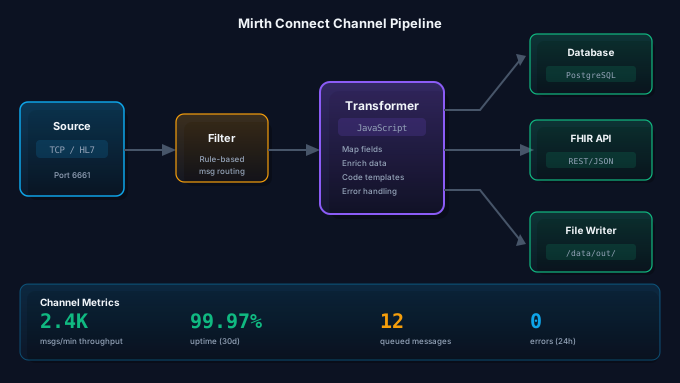
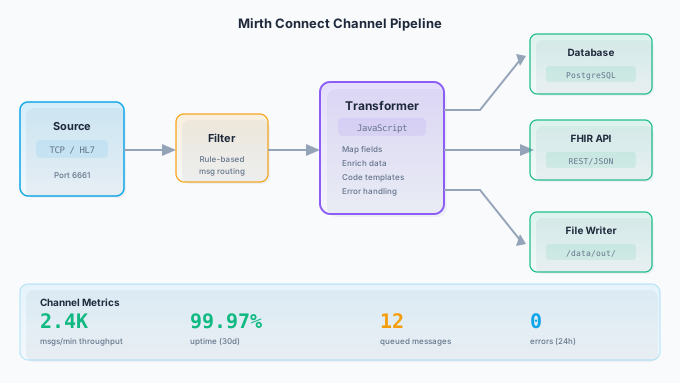
Mirth Connect and its open-source fork OIE (Open Integration Engine) remain the most widely deployed healthcare integration engines in the industry. Whether you are running a single instance processing ADT feeds for a community hospital or a multi-node cluster handling millions of messages per day for a health system, the same foundational practices determine whether your channels are reliable, performant, and maintainable.
This guide covers the channel development practices we have refined over years of Mirth Connect and OIE consulting work. These are not theoretical recommendations. Every practice here comes from real-world deployments where getting it wrong caused production incidents, data loss, or integration failures.
Everything in this guide applies equally to Mirth Connect 4.5.2, Mirth Connect 4.6+ (commercial), OIE, and BridgeLink unless noted otherwise.
Channel Naming Conventions and Organization
Channel naming seems trivial until you are staring at 200 channels in the administrator trying to find the one that is failing at 2 AM. A consistent naming convention pays for itself immediately.
Naming Pattern
Use a structured naming pattern that communicates the channel’s purpose at a glance:
[Direction] [MessageType] [System] [Port]Examples:
Inbound ADT Epic 6661Outbound ORU LabCorp 6670Router SIU Scheduling 6680Error Handler ADT 6699
The direction prefix (Inbound, Outbound, Router, Error) tells you the channel’s role without opening it. The message type (ADT, ORU, SIU, MDM) identifies the data. The system name identifies the trading partner. The port number makes network troubleshooting straightforward.
Channel Groups
Organize channels into logical groups. Common grouping strategies:
- By trading partner: All channels for Epic in one group, all channels for the lab system in another.
- By message type: All ADT channels together, all lab results together.
- By function: Inbound listeners, outbound senders, routers, error handlers.
Choose one strategy and stick with it. Mixing grouping strategies across your instance creates confusion.
Tags
Use tags to add metadata that does not fit in the channel name. Useful tags include the environment (prod, staging, dev), the project or go-live that created the channel, and the team responsible for maintenance. Tags are searchable in the administrator, making them useful for filtering.
Source Connector Best Practices
TCP Listener (MLLP)
The TCP Listener with MLLP framing is the most common source connector for HL7 v2 messages. Key configuration settings:
Receive Timeout. Set a receive timeout that is long enough for legitimate slow senders but short enough to release dead connections. 30,000ms (30 seconds) is a reasonable default. Too short and you will drop connections from systems that are slow to send. Too long and dead connections tie up resources.
Max Connections. Limit the maximum concurrent connections to prevent resource exhaustion. For a typical point-to-point HL7 feed, 5-10 connections is appropriate. For channels that receive from many sources, increase accordingly but set an upper bound.
Response. Configure the channel to send an ACK response after processing, not after receiving. This ensures the sending system knows the message was actually processed, not just received. Set the response to Auto-generate based on your HL7 version, or use a custom response script if you need to include application-level accept/reject logic.
Character Encoding. Explicitly set the character encoding to match your sending systems. UTF-8 is the safest default for new integrations. If you are working with legacy systems that send ASCII or ISO-8859-1, set the encoding accordingly. Mismatched encoding causes garbled characters in patient names, addresses, and clinical text.
HTTP Listener
For REST-based integrations and FHIR endpoints:
Authentication. Always require authentication for HTTP listeners that receive PHI. Use basic authentication at a minimum; token-based authentication (bearer tokens or API keys) is preferred. Never expose an unauthenticated HTTP listener to the network, even in a “secured” VLAN.
TLS. Enable TLS for all HTTP listeners. Use TLS 1.2 or higher. Configure the listener with a valid certificate, not a self-signed certificate, in production environments.
Request Size Limits. Set a maximum request size to prevent oversized payloads from consuming excessive memory. For HL7 FHIR bundles, 10-50 MB is a reasonable limit depending on your use case.
File Reader
File-based integrations are common for batch processing (lab results, claim files, CDA documents).
Polling Interval. Set the polling interval based on the expected file delivery frequency. For real-time feeds, 1-5 seconds. For batch files delivered hourly, 30-60 seconds. Aggressive polling on remote file shares can cause performance problems.
File Age. Use the minimum file age setting to avoid reading files that are still being written. Set the minimum age to at least twice the expected write duration. For large batch files, 60 seconds or more is appropriate.
Post-Processing. Always move or delete files after processing. Leaving processed files in the input directory causes reprocessing on the next poll. Move processed files to an archive directory with a date-stamped subdirectory structure for easy cleanup.
Destination Connector Patterns
Queuing
Enable queuing on destination connectors for any channel that sends messages to external systems. Without queuing, a destination failure causes the entire message to fail, even if other destinations in the channel succeeded.
Key queuing settings:
- Queue threads: Start with 1 thread per destination. Increase only if you need higher throughput and the destination can handle concurrent connections. More threads do not always mean more throughput; the bottleneck is usually the destination system.
- Retry on failure: Enable with a reasonable retry count (3-5 retries) and interval (30-60 seconds between retries). This handles transient network issues and brief destination outages.
- Rotate queue: Enable queue rotation so that a single stuck message does not block all subsequent messages. With rotation, Mirth tries the next message in the queue if the current one fails, then returns to the failed message later.
Connection Pooling
For database and HTTP destinations that handle high message volumes, connection pooling prevents the overhead of establishing a new connection for every message.
For database destinations, configure the connection pool size based on the number of queue threads and expected concurrency. A pool of 5-10 connections is typical for most healthcare integration workloads.
For HTTP destinations, Mirth Connect uses Java’s HTTP client connection management. Configure socket timeout, connection timeout, and keep-alive settings based on the destination system’s behavior.
Retry Logic
Design your retry strategy around the failure modes you expect:
- Transient failures (network blips, temporary service unavailability): Retry 3-5 times with 30-60 second intervals.
- Extended outages (destination system down for maintenance): Queue messages and let the queue drain when the system comes back. Set a queue buffer size large enough to hold messages during expected maintenance windows.
- Permanent failures (invalid message format, authentication failure): Do not retry. Route to an error channel for investigation.
The challenge is distinguishing between transient and permanent failures. Use the destination’s response code or error message to classify failures. HTTP 503 (Service Unavailable) is transient. HTTP 401 (Unauthorized) is permanent. HL7 AR (Application Reject) typically indicates a data problem that retry will not fix.
Transformer Best Practices
JavaScript vs. Mapping
Mirth Connect offers two transformer approaches: the visual mapper and JavaScript. Use the right one for the job.
Use the mapper for simple field-to-field mapping, static value assignment, and straightforward segment manipulation. The mapper is easier to read, easier to maintain, and performs slightly better than equivalent JavaScript for simple operations.
Use JavaScript for conditional logic, loops, complex data transformations, external function calls, and any logic that cannot be expressed as a simple mapping. JavaScript transformers are more powerful but harder to review and debug.
Avoid mixing approaches in a single transformer. Either map the entire transformation visually or write it all in JavaScript. Mixing makes the execution order confusing and the transformer difficult to maintain.
Performance Considerations
Transformer performance matters when you are processing thousands of messages per minute.
Avoid creating XML objects repeatedly. If you need to access the same XML structure multiple times in a transformer, parse it once and store it in a variable. Creating a new XML object for every access is expensive.
// Slow: parses XML on every accessvar patientName = msg['PID']['PID.5']['PID.5.1'].toString();var patientDOB = msg['PID']['PID.7']['PID.7.1'].toString();
// Better: access the PID segment oncevar pid = msg['PID'];var patientName = pid['PID.5']['PID.5.1'].toString();var patientDOB = pid['PID.7']['PID.7.1'].toString();
Move reusable logic to code templates. If multiple channels use the same transformation logic (date formatting, name parsing, identifier lookup), put it in a code template library. This avoids code duplication and makes updates easier.
Be cautious with database lookups in transformers. A database query that takes 10ms per message adds 10 seconds of latency per 1,000 messages. If you need reference data during transformation, consider loading it into a channel map at deploy time or caching it in a global map with a TTL.
Filter Design Patterns
Filters determine which messages a channel processes. Getting filters right prevents both missed messages (filters too aggressive) and processing errors (filters too permissive).
Source Filter vs. Destination Filter
Source filters run before the transformer and affect the entire channel. Use source filters for broad criteria: message type (process only ADT^A01, A02, A03, reject everything else), sending facility (process only messages from a specific system), or message validity (reject messages that fail basic structural validation).
Destination filters run before individual destinations and allow different destinations to process different subsets of messages. Use destination filters for routing: send ADT^A01 to the registration system, send ADT^A08 to the demographics update channel, send everything to the archive.
Filter Best Practices
Whitelist, do not blacklist. Define the specific message types and events you want to process, and reject everything else. This prevents unexpected message types from causing processing errors.
// Good: explicit whitelistvar messageType = msg['MSH']['MSH.9']['MSH.9.1'].toString();var eventType = msg['MSH']['MSH.9']['MSH.9.2'].toString();var allowed = ['A01', 'A02', 'A03', 'A04', 'A08'];return allowed.indexOf(eventType) !== -1;Log filtered messages. When a filter rejects a message, log enough information to investigate if the filter is rejecting messages it should not be. Include the message control ID, message type, and sending facility in the filter log entry.
Error Handling Strategy
Error handling is the difference between an integration that works and an integration that works reliably. Every production Mirth Connect deployment should have a comprehensive error handling strategy.
Error Channels
Create dedicated error channels that receive and process failed messages. The error channel pattern:
- On the failing channel, configure the error handling to route errors to a dedicated error channel (via the channel’s postprocessor or a destination error handler).
- The error channel receives the failed message, the error details, and metadata about the failure (source channel, timestamp, error type).
- The error channel stores the error in a database or file system for investigation.
- The error channel sends alerts (email, Slack, PagerDuty) based on error severity and frequency.
Alerting
Configure alerts that are actionable, not noisy. A good alerting strategy:
- Critical alerts (page/Slack immediately): Channel down, connection refused, authentication failure. These indicate the integration is not functioning at all.
- Warning alerts (email/Slack, no page): Elevated error rate, queue depth increasing, individual message failures for known-problematic trading partners.
- Info alerts (daily digest): Error counts by channel, message volume trends, queue statistics.
Avoid alerting on every individual message failure. In a high-volume environment, a single problematic sending system can generate thousands of alerts per hour, which desensitizes the team to legitimate critical alerts.
Dead Letter Queues
Messages that fail repeatedly after all retries should be routed to a dead letter queue (DLQ). The DLQ is a dedicated channel or database table that holds messages that could not be delivered. Key requirements:
- The DLQ must preserve the original message content, all error details, and the number of retry attempts.
- The DLQ must have its own monitoring and alerting.
- There must be a process for reviewing and reprocessing DLQ messages (manual review, automated retry after root cause is resolved).
Message Storage and Pruning
Mirth Connect stores processed messages in its database for auditing and reprocessing. Without pruning, this database grows indefinitely and degrades performance.
Retention Policies
Define message retention based on business and compliance requirements:
| Message State | Typical Retention | Rationale |
|---|---|---|
| Processed (success) | 7-30 days | Sufficient for troubleshooting recent issues |
| Errored | 90 days | Longer retention for investigation and compliance |
| Queued | Until delivered | Do not prune queued messages |
| Raw content | 7-14 days | Raw content is the largest storage consumer |
| Encoded content | 7-14 days | Encoded content is also large |
Pruning Configuration
Configure pruning on every channel. In the channel settings, set the metadata pruning and content pruning intervals. Enable archiving if your compliance requirements mandate long-term message retention, but archive to a separate storage system (file system, object storage), not the Mirth Connect database.
Performance Impact
An unpruned Mirth Connect database is the most common cause of performance degradation. When the message table exceeds tens of millions of rows, every operation (message search, dashboard statistics, channel deployment) slows down. Prune aggressively and monitor database table sizes.
Monitoring and Alerting
Built-In Dashboard
The Mirth Connect dashboard provides real-time visibility into channel status, message counts, and error rates. Use it for day-to-day monitoring, but do not rely on it as your only monitoring mechanism. The dashboard requires the Mirth Administrator to be open, and it does not provide historical trends or external alerting.
External Monitoring
Integrate Mirth Connect with your organization’s monitoring stack:
- Log forwarding: Configure Mirth Connect to forward logs to a centralized logging platform (ELK, Splunk, Datadog). Parse the logs to extract channel-level metrics, error messages, and performance data.
- API-based monitoring: Use the Mirth Connect REST API to poll channel statistics, connection status, and queue depths from an external monitoring tool. Build dashboards that show message throughput, error rates, and queue depth trends over time.
- Health check channels: Create a lightweight channel that serves as a health check endpoint. External monitoring tools can ping this endpoint to verify that the Mirth instance is responding.
Security Hardening
TLS Configuration
Enable TLS for all external-facing connectors (MLLP listeners, HTTP listeners, web server). Use TLS 1.2 as the minimum version. Disable weak cipher suites. Use certificates from a trusted CA for production environments.
For MLLP over TLS, both the listener and the sender must be configured with compatible TLS settings. Test TLS connectivity with openssl s_client before going live:
openssl s_client -connect mirth.example.com:6661 -tls1_2User Access Control
Implement role-based access control in the Mirth Connect user management:
- Admin role: Full access, limited to a small number of senior engineers.
- Developer role: Channel read/write, code template read/write, no user management.
- Operator role: Channel read-only, deploy/undeploy, message search. No channel editing.
- Monitor role: Dashboard read-only. No channel access.
Create separate user accounts for each person and for automated systems (CI/CD deployment accounts). Do not share the default admin account.
API Security
The Mirth Connect REST API provides full administrative control over the instance. Secure it:
- Restrict API access to specific IP addresses or network ranges.
- Use TLS for all API communication.
- Create dedicated API user accounts with limited permissions.
- Monitor API access logs for unauthorized access attempts.
Version Control with MirthSync
Manual channel management does not scale. Use MirthSync to bring Git-based version control to your Mirth Connect or OIE channels.
MirthSync extracts channel configurations into the filesystem, where they can be tracked in Git, reviewed in pull requests, and deployed through CI/CD pipelines. This eliminates configuration drift between environments, provides rollback capability, and creates an audit trail for every channel change.
For a complete CI/CD setup guide, see our post on Mirth Connect CI/CD with MirthSync.
OIE Compatibility Notes
OIE (Open Integration Engine) is a community fork of Mirth Connect maintained by Kaur Health. For the purposes of channel development best practices, OIE is functionally identical to Mirth Connect. All the practices in this guide apply.
Key differences to be aware of:
- Branding and UI. OIE uses different branding in the administrator console, but the channel model, connector types, and transformer engine are the same.
- Plugin compatibility. Most Mirth Connect plugins work with OIE. Test your specific plugins before migrating.
- MirthSync compatibility. MirthSync works with OIE, Mirth Connect, and BridgeLink. Your version control and CI/CD workflows carry over regardless of which engine you run.
- Community vs. vendor support. OIE is community-supported. For complex issues, you are relying on community forums and Kaur Health rather than NextGen Healthcare support.
For a detailed comparison of your options, see our post on Mirth Connect alternatives.
Cloud Deployment Considerations
Running Mirth Connect or OIE in the cloud (AWS, Azure, GCP) introduces additional considerations.
Containerized Deployment
Package your Mirth Connect or OIE instance as a Docker container for consistent, repeatable deployments. Include your custom plugins, configuration, and any required dependencies in the container image. Use a managed container service (ECS, AKS, GKE) or Kubernetes for orchestration.
Database Selection
Use a managed PostgreSQL instance (RDS, Azure Database for PostgreSQL, Cloud SQL) as the Mirth Connect database. PostgreSQL provides the best performance for Mirth Connect’s query patterns. Avoid MySQL in production; its handling of large binary columns (where Mirth stores message content) is less efficient than PostgreSQL.
High Availability
For production workloads, deploy at least two Mirth Connect instances behind a load balancer. Use a shared database (managed PostgreSQL with read replicas) and configure channels to avoid conflicts in multi-instance deployments. Channels with TCP listeners should use port-based routing so that each listener is active on only one instance.
Logging and Monitoring
Forward Mirth Connect logs to the cloud provider’s logging service (CloudWatch, Azure Monitor, Cloud Logging). Set up alerts for channel errors, queue depth, and resource utilization. Use the cloud provider’s metrics and dashboards to track trends over time.
These practices are not a checklist to implement all at once. Start with the areas that cause the most pain in your current environment (usually error handling and monitoring), and systematically improve from there. The goal is a production integration environment that is reliable, maintainable, and auditable.
For help optimizing your Mirth Connect or OIE deployment, explore our related services:
- Mirth Connect Services — Expert consulting for Mirth Connect deployment, optimization, and migration
- OIE Services — Open Integration Engine support and migration assistance
- MirthSync — Git-based version control for Mirth Connect and OIE channels
- Mirth Connect Alternatives — Compare your options after the 2025 licensing change